Findo: Find my Friends, Phone
- 4.1
- Rating
- 1.00M
- Installs
- Free
- Price

 Analysis by App-foxy
Location sharing is one of those phone features that can be genuinely useful and slightly uncomfortable at the same time. I tested Findo: Find my Friends, Phone with that balance in mind: not simply whether it can help someone find a family member, but whether the experience gives people enough control to use it responsibly. It is a free lifestyle app from BP Mobile LLC, aimed at keeping track of people who have agreed to share their location. That distinction matters. A family locator should support communication and reassurance, not become a quiet way to monitor someone.
My overall impression is that Findo is most appealing for households that want a dedicated location-sharing tool rather than relying on scattered messages, map pins, or repeated “where are you?” calls. It has reached more than a million installs and holds an average rating of 4.1 from roughly nineteen thousand ratings, so it is clearly being used by a substantial audience. At the same time, those figures do not remove the need to think carefully about consent, battery behavior, phone settings, and who can see what. The app works best when everyone involved understands the arrangement before sharing begins.
What Findo feels like in everyday family use
The basic appeal is easy to understand. Imagine a parent waiting for a teenager to return from an activity, partners coordinating a meeting across town, or adult children checking whether an older relative has arrived safely. Instead of sending a message and waiting for a reply, a location tracker can provide a quicker reference point. In my experience, that convenience is most valuable during ordinary transitions: leaving school, commuting home, meeting at a busy place, or confirming that a family member has reached a destination.
You May Also Like

 Blood Strike: 2.5 Anniversary
Blood Strike’s Loadouts Turn Every Drop Into a Tactical Gamble
A close look at Blood Strike’s custom loadouts: how fast access to signature weapons reshapes its battle royale rhythm, rewards preparation, and narrows the gap between fights.

 Pandora - Music & Podcasts
Pandora’s Music Is Easy to Start, but Harder to Recover
Pandora’s strength is its low-effort path from a seed to a station. Its weak spot is how much confidence it asks you to place in connection, setup, and quiet recovery.

 8 Ball Pool
 Is Built on Rivalries, Rematches, and Routine
A close look at the rivalries, rematches, shared routines, and unanswered safety questions that turn a quick pool match into a persistent mobile community.

 Samsung Music
’s Quiet Strength Is Playing What You Already Own
Its reach comes less from spectacle than from dependable access to a personal library. That simplicity is both the app’s strongest retention engine and its ceiling.

 AccuWeather: Weather Radar
AccuWeather Review: A Quick, Clear Forecast for Everyday Decisions
For everyday plans, the best forecast is the one you can understand quickly. AccuWeather makes rain timing, radar, and local conditions easy to act on, with a few trade-offs.

 Hill Climb Racing
Why Hill Climb Racing Still Turns Crashes Into One More Run
A tiny car, a bumpy hill and one more upgrade: Hill Climb Racing keeps resurfacing because its simple chaos makes every near-miss feel personal.
More From Our News Desk



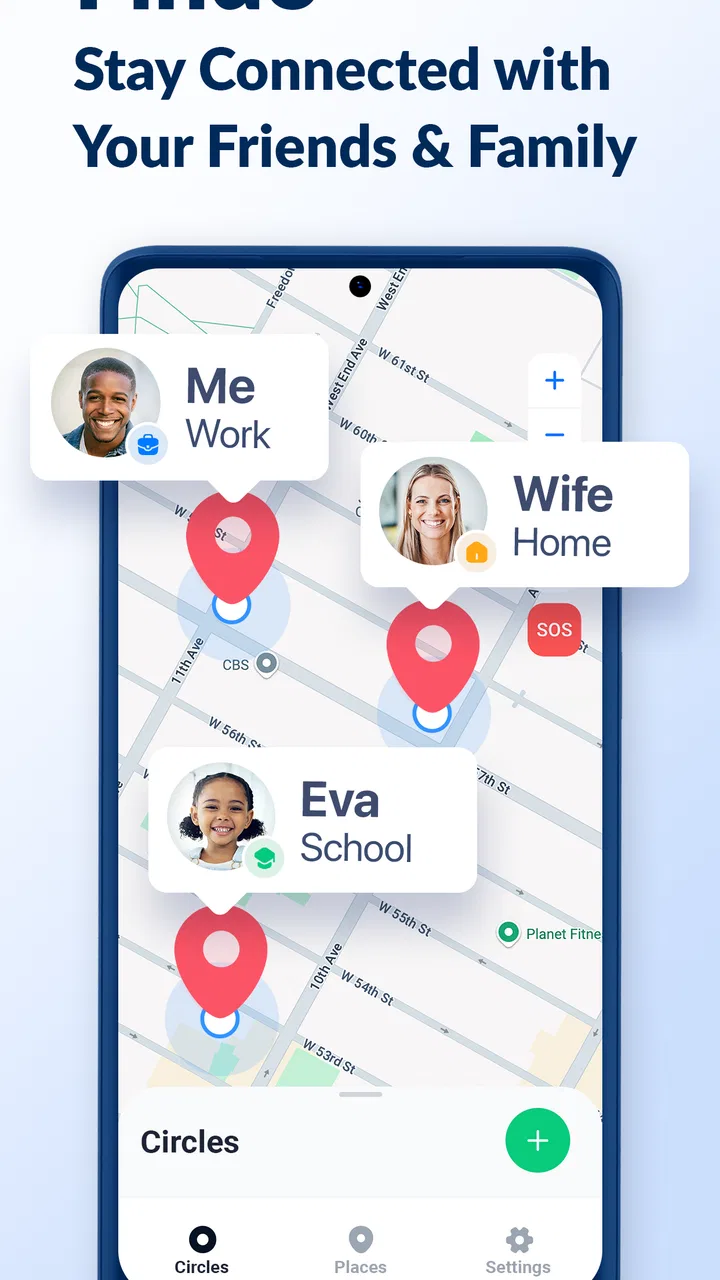
Findo presents itself as a family-oriented location tracker, and that focus gives it a clearer purpose than a general map application. A standard maps app is excellent for directions and temporary location sharing, but it is not always the first place people think of when they want an ongoing family routine. Findo is designed around the relationship between people, so the useful question becomes “who in my circle is available to locate?” rather than “which map pin did I send?”
That does not mean it replaces messaging or navigation. I would still use a messaging app for explaining a delay, a map app for planning a route, and a phone call when something is urgent. Findo is better viewed as a shared reference layer. It can reduce unnecessary check-ins, but it cannot explain why someone is late, confirm that they are safe in every situation, or substitute for direct conversation.
A realistic routine that shows its value
Consider a family with different schedules. One person leaves work, another finishes an evening class, and someone else is waiting at home. Without a location tool, the household may exchange several messages simply to coordinate arrival times. With Findo, the family can check the agreed shared view first, then contact one another only when a real question remains. That is a small improvement, but repeated every day it can make coordination less tiring.
The important word in that example is “agreed.” I would not install a tracker on a family member’s phone and treat installation as permission. Every person should know what is being shared, with whom, and for what reason. For teenagers, parents may have legitimate safety concerns, but the conversation should still be clear. For adult relatives, location access should never be presented as an obligation disguised as care.
Another useful situation is meeting at a crowded venue. Rather than describing a landmark badly or sending a temporary pin that gets buried in a chat, a shared family locator can help people understand where the others are in relation to the meeting point. The benefit is practical, not dramatic: fewer missed connections and less time standing outside while trying to describe exactly which entrance you are near.
Where the experience needs patience
Location apps are dependent on the phones around them. If a device has weak connectivity, restrictive background settings, low battery, or location access disabled, the displayed position may be old or unavailable. That is not a flaw unique to Findo, but it is a limitation users must understand before trusting any map view. I would never interpret a stationary marker as proof that a person is still in that exact place.
This is also why I would avoid using a location tracker as the only safety plan. A family should still have a simple fallback: call the person, send a message, and know what to do if the phone is lost or offline. Findo can make routine awareness easier, but it is not an emergency response service. Treating it as one would create false confidence at precisely the wrong moment.
The app is free to download, while in-app purchases range from $4.99 to $39.99 per item. That makes it easy to try without an initial payment, but I would examine any purchase screen carefully before confirming anything. Families should decide in advance whether the free experience is sufficient and whether a paid option genuinely solves a problem they have. A location app is not automatically more trustworthy or more accurate simply because a payment is involved.
Trust depends on visible choices, not comforting language
For me, the central question is not whether Findo uses friendly wording. It is whether each person can make an informed choice about participation. The app’s purpose involves sensitive information by nature: a person’s whereabouts can reveal routines, workplaces, schools, medical visits, social activities, and periods spent at home. Even a well-intentioned family should treat that information with care.
I recommend setting up the app together whenever possible. The person sharing a location should be present while the account or group is configured, should understand which contacts are included, and should know how to stop sharing if circumstances change. This approach is more respectful than one person managing everything from their own phone. It also gives less technical family members a chance to ask questions before the arrangement becomes part of daily life.
One practical habit is to review the group whenever the family situation changes. A former partner, an old roommate, a changed caregiver arrangement, or a child becoming an adult can all make an earlier sharing decision inappropriate. Do not assume that removing the app from a home screen is enough. Check the visible account and sharing controls, then confirm that the person understands the result on their own device.
Permissions deserve a deliberate setup
When a location app asks for access, I prefer to slow down rather than accept every prompt automatically. Read what the phone displays, consider whether the requested access matches the feature you intend to use, and revisit the operating system’s permission settings later. The exact choices available can vary by phone, but the principle is consistent: location access should be granted intentionally, not out of habit.
Battery behavior is another part of the trust conversation. Continuous or frequent location updates can affect a phone differently depending on its hardware, network conditions, and system settings. I would test Findo during normal use before making it part of a safety routine. If someone’s phone regularly reaches a low battery because of the way tracking is configured, the family may gain a map view but lose the ability to contact that person later.
It is also worth checking notification behavior. A family member may want alerts about changes, while another may find frequent notifications stressful. The right arrangement is not necessarily the one with the most alerts. I prefer a quieter setup for routine days and direct contact for anything urgent. If the app offers choices around notifications or sharing visibility, use the least intrusive setting that still meets the household’s real need.
Think about sensitive moments before they happen
There are situations where location sharing can expose more than a person intends. A visit to a clinic, a confidential meeting, a religious service, a support group, or a private social event may be visible through a location history or a live map, depending on how the app and account are configured. I would discuss these moments in advance rather than waiting for conflict after someone discovers that a private routine was visible.
The same caution applies to shared phones and family accounts. If several people use one device, or if an account remains signed in on a phone that changes hands, the wrong person may see information meant for someone else. I would use separate device access where possible and check the account identity before sharing a location. Convenience should not override basic account hygiene.
Parents should be especially careful not to turn a safety tool into constant surveillance. A clear schedule can help: perhaps sharing during a journey or while a young person is away from home, rather than treating every minute as subject to inspection. Older children and teenagers are more likely to cooperate honestly when they understand the reason for the arrangement and have a voice in its boundaries.
What I would check before inviting anyone
Before adding a family member, I would work through a short routine:
- Explain the purpose in plain language and ask for agreement.
- Confirm which people will be able to view the location.
- Review phone permissions and battery expectations together.
- Decide how to handle private trips, work hours, and changing circumstances.
- Test the setup with a low-stakes journey before relying on it.
That last step is easy to overlook. A test trip can reveal whether the map updates in a useful way, whether notifications are too frequent, and whether a family member knows how to pause or change participation. It is much better to discover confusion while someone is visiting a nearby shop than during a late-night journey when everyone is already worried.
How it compares with familiar alternatives
The usual alternative is to use a phone’s built-in location sharing or a map application that already exists on the device. Those options may be preferable for people who want fewer apps and already understand their account settings. They can also be convenient for one-off sharing, such as letting a friend follow a trip or finding one another at an event.
Findo makes more sense when the household wants a dedicated family context. Its value is less about replacing a map and more about giving location sharing a separate place in the family’s routine. That separation can be helpful for people who do not want important safety information mixed into busy conversations. On the other hand, adding another app means another account or permission flow to understand, another notification system to manage, and another service to review when phones or relationships change.
I would choose a built-in option for occasional sharing with a small number of people who are already comfortable with it. I would consider Findo for a family that repeatedly coordinates locations and wants that activity kept distinct from navigation and messaging. Neither choice is automatically better. The deciding factor is whether the people involved can understand and control the arrangement without confusion.
Who is likely to appreciate it most
Findo is a good fit for families that value convenience but are willing to have an honest conversation about boundaries. It can help households with varied schedules, caregivers coordinating with relatives, and people who regularly meet in unfamiliar or crowded places. It may also suit less technical users who prefer a focused app instead of piecing together temporary map shares and message threads.
I would be more cautious recommending it to someone who wants completely passive monitoring, expects perfect real-time accuracy, or does not want to discuss consent. It is also not the right choice for a person who needs professional emergency tracking, detailed fleet management, or a guaranteed record of every movement. Those needs call for specialized tools and clearer operational assurances than a general family lifestyle app should be expected to provide.
The age rating is Everyone, which makes the app broadly approachable, but that label does not answer the more important family questions. An app can be suitable for a wide audience while the decision to share a particular person’s location still requires maturity and care. I would focus less on the label and more on the household’s ability to set fair rules.
Version, cost, and the practical decision
The current version is 1.11.0, and the app was released on June 12, 2024. Those details are useful when checking compatibility and deciding whether the app fits a recently updated phone. It requires operating system version 10 or later, so older devices may not be suitable. Before inviting a whole family, I would confirm that every intended phone meets that basic requirement.
Because the download is free, the sensible approach is to install it on one or two devices first and evaluate the setup before expanding the group. Pay attention to how clear the sharing choices feel, whether the location view updates reliably during ordinary travel, and whether the notifications fit the family’s habits. If the experience creates more checking and anxiety than it removes, it is not solving the right problem.
I also recommend agreeing on a deletion plan. If the family stops using Findo, remove unnecessary members, review permissions, and decide whether the app should remain installed. This is not about assuming a problem with the developer, BP Mobile LLC, or the product. It is simply good practice for any service that deals with personal location information. Fewer unused accounts and permissions mean fewer things to remember later.
My cautious verdict
I see Findo as a practical family coordination app rather than a complete safety system. Its strongest use is reducing routine uncertainty: knowing whether someone is on the way, finding a family member at a meeting point, or avoiding a string of repetitive check-in messages. The dedicated lifestyle focus can be more comfortable than using a general map tool, especially for households that want location sharing to be a regular, separate activity.
My recommendation comes with a condition: install it as a shared agreement, not as a hidden observation tool. Start with the smallest group and the least intrusive settings that meet the need. Test it during normal travel, watch battery and notification behavior, and revisit access when relationships or routines change. Those steps do more for trust than any reassuring phrase in an app description.
For a family that wants straightforward location awareness and is prepared to manage permissions and boundaries, the free entry point makes Findo worth trying. For someone seeking guaranteed emergency coverage, complete surveillance, or a tool that requires no ongoing attention, I would choose something else or avoid location tracking altogether. In my view, the best reason to use Findo is calmer coordination, not tighter control.
FAQs for Findo: Find my Friends, Phone
01What is Findo: Find my Friends, Phone used for?
Findo: Find my Friends, Phone is designed to help users share and view real-time locations with trusted contacts, as well as locate a misplaced phone when the relevant features are enabled. It can be useful for coordinating with family or friends, checking whether someone has arrived safely, or finding a device. Its usefulness depends on location permissions, internet access, compatible devices, and consent from everyone involved.
02Does Findo require permission to access my location?
Yes. Location access is a core requirement for most of Findo’s tracking features. During setup, the app may request permission to use your location while the app is open or in the background, depending on the functions you choose. You should review these requests carefully and select the least permissive option that still meets your needs. Location sharing should always be enabled knowingly and only with people you trust.
03Can I use Findo to track someone without them knowing?
No responsible location-sharing service should be used for secret monitoring, and Findo should only be used with the clear knowledge and consent of the people being located. Participants generally need to accept an invitation or enable sharing on their own device. Misusing tracking features can violate privacy, app policies, or local laws. Before creating a circle or requesting someone’s location, explain how sharing works and how it can be stopped.
04Will Findo work if my phone has no internet connection or the battery is dead?
Findo’s live location features normally depend on a working combination of GPS, mobile data or Wi-Fi, and sufficient battery power. If a phone is offline, has location services disabled, is inside an area with weak signal, or has run out of battery, its position may be delayed or unavailable. The app may show a last known location, but this should not be treated as proof of the phone’s current position.
05Is Findo: Find my Friends, Phone free to use?
Findo may offer basic location-sharing or device-finding functions at no cost, while additional tools can depend on subscriptions, in-app purchases, or the specific version available on Android and iOS. Before downloading, check the current store listing for trial conditions, recurring billing, and included features. Also review battery usage and privacy information, since background location services can affect battery life and involve the handling of sensitive location data.
Pros
- Accurate location sharing helps keep track of family and friends.
- SOS features can provide extra reassurance during emergencies.
- Supports multiple contacts and group location monitoring.
- Useful for finding a misplaced phone or checking its last location.
- Simple interface makes core tracking tools easy to access.
Cons
- Continuous location access may noticeably affect battery life.
- Some features may require a paid subscription or in-app purchase.
- Location accuracy can drop indoors or in areas with weak signals.
- All participants must agree to share their location.
- Background tracking may raise privacy concerns for some users.

Findo: Find my Friends, Phone
Gallery